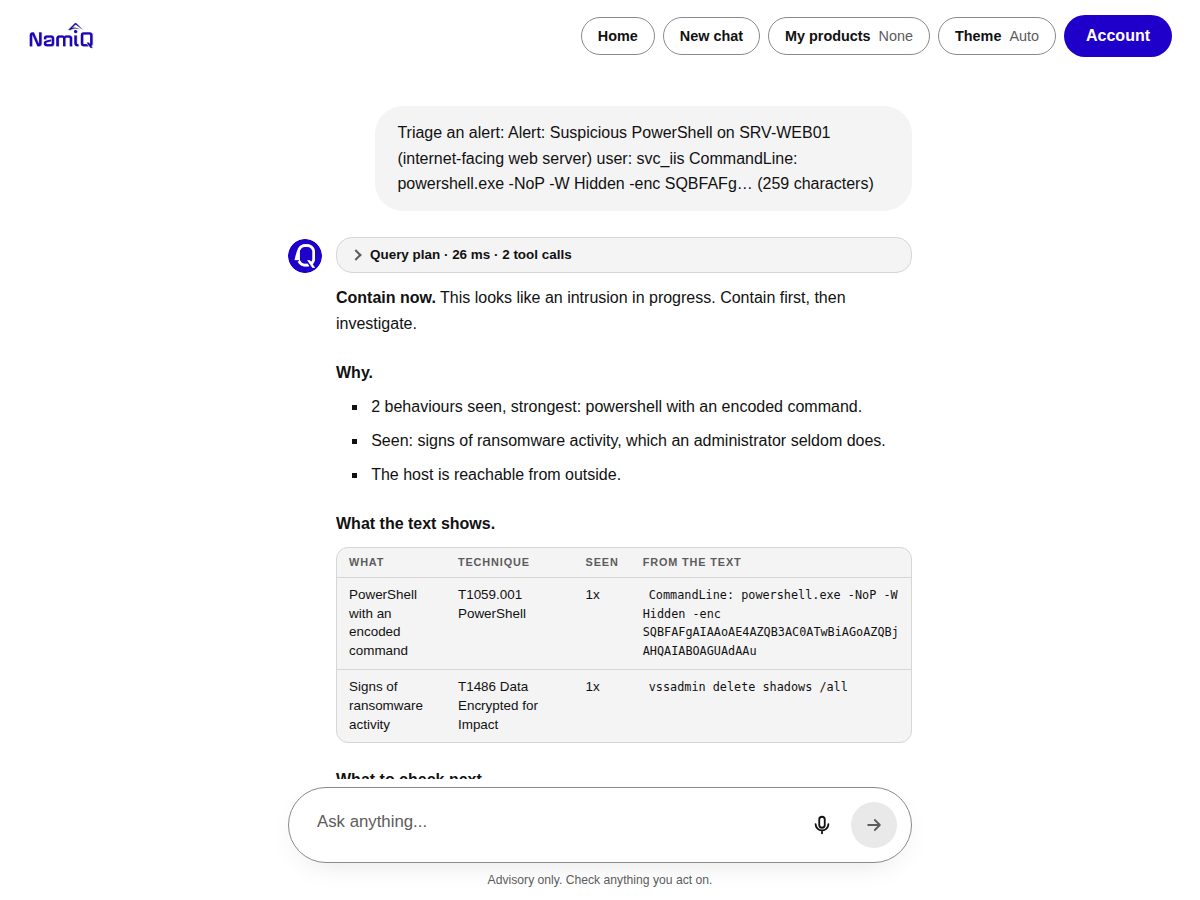
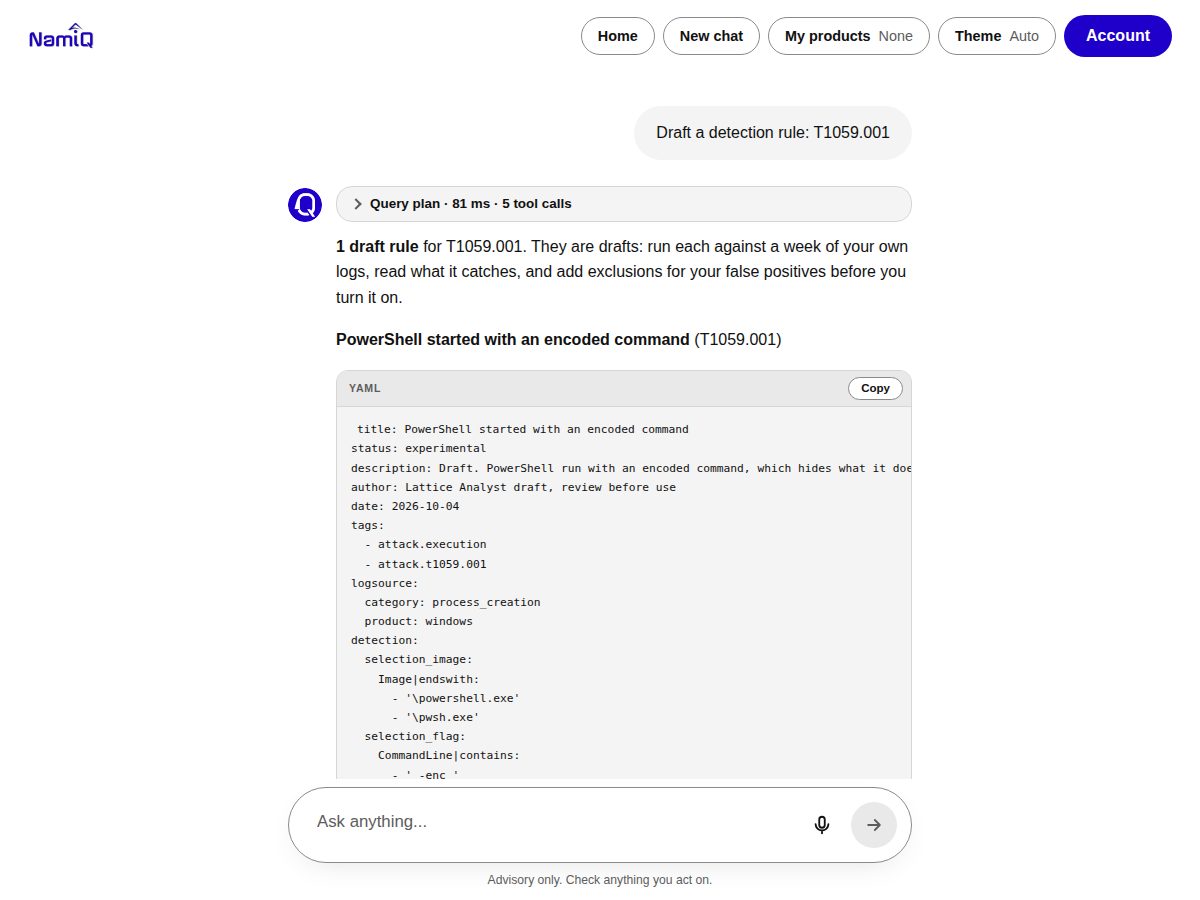
Paste an alert, an email, logs or a list of CVEs. Get a verdict, the evidence behind it and the next steps. Facts are written in code from a cyber knowledge graph, and a person always decides.
Every answer comes with its query plan and its evidence
Open the query plan to see each graph call and model call and how long it took. Open the evidence pane to see the exact nodes the answer rests on, why each one is there and how many hops it sits from the question.
Query plan. Every graph call, code step and model call with its time. The facts are worked out in code; the model call shows its tokens; the answer is then checked against the evidence.Evidence pane. Each node with its kind, why it is there and its hop, the share of cited ids verified, and the graph path from the CVE through the weakness to the techniques.
Why it exists
Analysts need an answer in seconds, and a reason to trust it
Generic chat assistants sound sure and can invent a version, a date or a verdict. Lattice Analyst takes the opposite approach: the facts and the decisions come from code and a graph of public sources, and the language model only turns them into readable steps.
Verdict first
Every answer opens with a clear label and the reasons, so you can act or escalate without reading a wall of text.
Evidence you can check
A query plan lists every graph call and model call with its time, and an evidence panel shows the nodes behind the answer.
Honest about what it cannot see
It never says “safe” and never claims something happened on your systems. Each answer lists what is missing.
Local model, no external AI
Answers are written with a local language model. No external AI service is called, so your pasted text stays in the service.
How it works
One recipe for every activity
Every activity follows the same five steps, so answers stay correct and the interface stays simple.
1
One input
Tap a recipe or paste. Pasted text suggests the matching recipe and never runs by itself.
2
Read in code
Indicators, timestamps, headers and behaviours are extracted by rules. Addresses are shown defanged.
3
Facts from the graph
Exploitation status, fixed versions, techniques, groups and detections come from the graph, never from the model.
4
Verdict by written rules
Weights and named exceptions, reviewed like detections.
5
Show and hand over
Verdict, evidence, steps, and drafts that say they are drafts.
Ask about any CVE
The verdict line is written from CISA's record in code: whether it is exploited, whether ransomware use is recorded, the deadline and the fixed versions. The model then explains in plain words, and its steps are checked before you see them.
Query plan with timing for every call
Evidence panel with the source of each link
Follow-up actions on the CVE: checklist, hunt, containment
Triage a paste
Alerts get a label (contain now, escalate, investigate, monitor or need more information) from behaviour rules, with the technique behind each finding and what to check next. Emails are judged by structure, such as failed sender checks and look-alike domains, not by wording alone.
No model is used for the verdict
A claim of approval is to be verified, never believed
Containment steps are suggestions for a person to approve
Draft, review, copy
Detection rules, messages and incident reports are drafted from reviewed templates and the facts you pasted. Anything unknown stays a visible blank. Code blocks have a Copy button.
Sigma rule drafts with their false positives
Management, user and customer message drafts
Post-incident report in a copyable block
What it does
The activities an analyst repeats every day
Stage
Recipes
Triage
Today's briefing · Triage an alert · Triage an email · Triage scanner output
Investigate
Build a timeline from logs · Investigation checklist · Hunt hypotheses · What usually follows
Respond
Draft the messages · Containment plan · Ask the runbook · Which CVEs to patch first
Improve
Post-incident report · Draft a detection rule
Personal
My products: save what you run in your browser, then ask “Does this CVE affect me?”
Everywhere you work
Built for the desk and the phone
Installable and responsive
The chat works on a phone as well as on a desktop, follows the light or dark system theme, and can be installed as an app. Your conversation stays in the page: go Home to the watch lists and come back to it.
Trust and safety
Designed so a person stays in charge
What it will not do
It will not say something is safe, close a ticket, send a message, or run an action. It cannot see your systems, so every answer says what to verify. Drafts are labelled as drafts and unknown facts are left blank.
Privacy by design
The list of products you run is kept in your browser and is sent only inside a question about exposure. The service does not keep what you paste.
Public sources, with notices
Answers rest on public cybersecurity sources, and each link states which source said it or that it was inferred.
Advisory only
Check anything you act on. Containment steps list what they affect and who should approve them.
FAQ
Common questions
Does it connect to my SIEM or scan my network?
No. It works on what you paste and on public data. It cannot tell you whether you are affected, exploited or covered by a rule.
Which AI model does it use?
A local language model, with no external AI service. The model words the explanation; verdicts, facts and structure are written in code.
Can I use the graph from my own AI agent?
Yes. The same graph is served as an MCP server. See the Lattice MCP page for the install guide.
How do I get access?
Open the chat and sign up for a trial key. Keys are rate limited, and verifying your account raises the limits.
Is it production ready?
It is in private beta, provided as is, with no warranty and no service level, under the Lattice beta terms.